
Swim Meet 101
- During the summer season, there are 6 SVAL dual meets held on Tuesday or Thursday evenings.
- Meets begin at 6:00 pm and generally end between 8:00 and 9:00 pm. Swimmers will need to be at the pool by 5:00PM (or earlier) to get ready for warm-ups, unless otherwise directed by the coaches.
Swimmer Check In:
- Swimmers/Parents: Upon arrival at the meet, swimmers must check in with the HEAD COACH and then review their individual “heat sheet”. This will be taped to a wall/ fence/picnic table with the UM Head Coaches. (For home meets: this will be in front of the women’s locker room).
- Parents/Guardians: Please take a picture of the heat sheet to confirm and monitor events. Some swimmers may want to write their events on their arm.
- How to decipher the Athlete Check In:
- Coaches will print out “Athlete Check in Report” which contains every meet event by athlete (it will look like this):
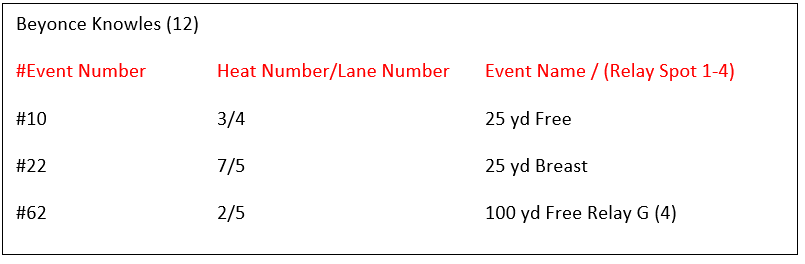
- Each sheet contains the following information: Event number, event title, heat number, status of heat, lane number, swimmer’s name, swimmer’s age for season, swimmer’s team, and swimmer’s entry time (if available). As the season progresses and swimmers achieve entry times, the heats will be organized by time.
What to Bring to the Swim Meet:
- plenty of towels!
- Goggles and EXTRA goggles (two pairs in case one breaks)
- swim cap
- healthy snacks and drinks (lots of water)
- layers of warm clothes to put on after events (very important on cooler or windy evenings)
- marker for noting events on swimmer’s hand
- fun activities for your swimmer to do between events (eg deck of cards)
- chairs for attendees and swimmers (most pools do not have many chairs available for use during a meet)
- blanket (or extra towel) for swimmer or family to sit on
- sports umbrella for swimmers to sit under
SVAL Summer League Swim Meet Order of Events/Timeline
-
Details
- Boys and girls swim each event separately.
- The events for each stroke go from youngest to oldest. The girls in a given age group swim the even first, followed by the boys.
- Each event may have several HEATS for each gender and age group
-
Order of Events:
-
Medley Relay
- It is a relay consisting of 4 swimmers.
- The Medley Relay has a specific stroke order: (1) backstroke, (2) breaststroke, (3) butterfly, and (4) freestyle. Since the younger children only swim one lap each, those swimmers swimming the breaststroke and freestyle portion of the relay must be at the opposite end of the pool, not the starting block end. Those swimmers will start in the water.
- Freestyle
- Backstroke
- Breaststroke
- Butterfly
-
Freestyle Relay
- The freestyle relays are the last events of the meet.
- The children love relays and get a real sense of being part of a team by competing in them.
- Unforeseen circumstances may result in a child being placed in the relay at last minute, so never leave meets early!
- The relay team has 4 swimmers all swimming Freestyle.
- Ages 10 and under swim a total 100 meter relay, which means each swimmer swims one lap (25m) of freestyle.
- Ages 11-12 and up all swim a total 200 meter relay, which means each swimmer swims two laps (50m) of freestyle.
-
Medley Relay
Quick Reference
-
Medley Relay (100M or 200M)
- Order: Backstroke, Breaststroke, Butterfly, Freestyle
- All ages swim this event
- 10 & U ONLY: one lap of each stroke (Breaststroker and Freestyler must be at opposite end of the pool!)
-
Freestyle Relay (100 M or 200M)
- For 10 & U: one lap of freestyle (2nd and 4th swimmers (aka “anchor”) child must be at the opposite end of the pool)
Swim Meet: Volunteer 101
Volunteers Should Check
in with Board Member to obtain your clip board with detailed description of job
responsibilities.
Job Roles (no training required):
- Announcer: The volunteer that will announce the start of meet, intermission (when necessary), and end of the meet on the PA system. Standing poolside, the Announcer will calls the swimmers up, announces names which heat is next and work with the starter on starting each event.
- Deck Parent (Boys and Girls):Arrive 30 minutes prior to the meet start time – and stay until all events have been organized/started. This volunteer will receive the “heat sheets” which contains details for every event in the order of the events. They will monitor the events and organize/line up the swimmers before their events. They will take the swimmers to the ready bench where assistant coaches will formally line them up at the starting blocks. This volunteer will also need to help line up swimmers for relays and remind swimmers of the medley stroke order.
- Timer: Three timers will be assigned to each lane and clock the swimmers with handheld stop watches (from the moment the race is started to the touch at the finish) then records the time on a timing slip and hands off to the timer runner – best seats during a meet!
- Timer Runner: One of the timer positions will need to collect timer sheets after each event throughout the meet to bring to the console desk for entry into the computer.
- Place Judge: The official that will record what order that the lanes completed at the conclusion of each event.
- Lollipop/Fundraiser Sales: Help with home meet concessions and fundraising as required
- Water: Walks around with rolling cooler to deliver bottled water to all volunteers and coaches as needed.
- Parking Attendant: For larger meets at Upper Merion pool, we may ask some parents to help to direct traffic and appropriate parking. This is required 1 hour before the meet start.
Job Roles (some training or previous experience required)
- Computer: The volunteer that manually enters the times into the software on the computer as each event completes.
- Starter: checks with the timers and console operators that they are ready, uses a starting buzzer to start the race, signals any false starts, then clears the pool lanes after each heat.
- Stroke and Turn Judge: The official that monitors and determines that each swimmer is following correct stroke mechanics and completing turns per the USA swimming rules.
This content can be easily deleted as you create your own content: go to Manage Site > Edit Page Content and click on the pencil icon in the upper right corner of each snippet. You may rename, move, or delete this page by going to Manage Site > Edit Navigation; for more information, see our Help Center article here.
Text Area
Simple formatted text

